Auto-Generating Flow Free Levels in Unity with Z3
How I use Z3 and a validate-and-block loop to synthesize solvable Flow Free puzzles straight from the Unity Editor
I recently rebuilt a Flow Free clone in Unity, and the part I enjoyed most wasn’t the gameplay — it was teaching my project to invent its own levels. Instead of hand-drawing puzzles, I describe the rules of a valid puzzle to a constraint solver and let it produce as many as I want.
In this post I’ll walk through the logic of that generator: how to model a Flow Free board as a set of constraints, the one subtle trap that pure constraints don’t catch, and how I keep the whole thing from freezing the Editor.
The full source is on GitHub: FlowFree-Tools.
What is Flow Free?
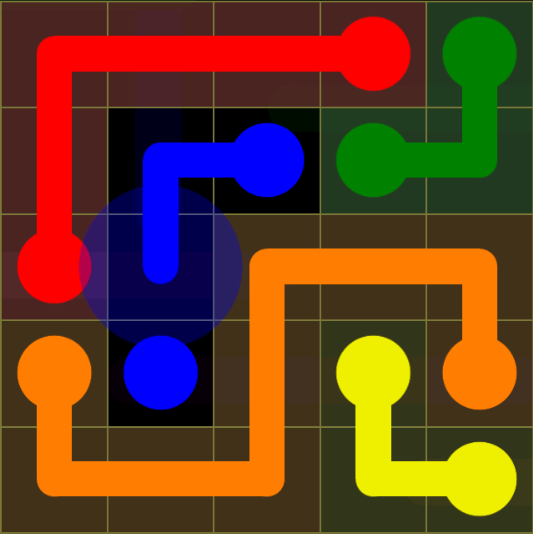
Flow Free gives you a grid with pairs of colored dots. You connect each pair with a pipe, and you win when:
- Every pair of same-colored dots is connected by a single path, and
- Every cell on the board is filled (no empty squares).
Paths can’t cross or branch. That “fill the whole board” rule is what makes it a puzzle instead of a maze — it forces the paths to weave around each other.
The project structure
The game side is deliberately small. The important thing for this article is that maps are just CSV files, where each number is a color id:
1,1,3,3,3
2,1,3,1,2
2,1,3,1,2
2,1,1,1,2
2,2,2,2,2
The generator lives in an Editor-only folder so the solver never ships in a build:
Assets/Scripts/Game/_GenMap/Editor/
├── GenConfig.cs          # parameters + feasibility checks
├── MapGenerator.cs       # the Z3 model + solve loop
├── PathValidator.cs      # the safety net (more on this later)
├── CsvMapWriter.cs       # grid <-> CSV, with a round-trip check
├── MapGeneratorWindow.cs # the EditorWindow UI + threading
└── Plugins/              # Microsoft.Z3.dll + libz3.dll (editor-only)
I use Z3, Microsoft’s open-source theorem prover. Placing both the managed Microsoft.Z3.dll and the native libz3.dll under an Editor folder means Unity automatically flags them editor-only — they’re used to author content, not at runtime.
Why a constraint solver instead of random walks?
The naive approach is to grow random paths and hope they tile the board. It works for tiny grids, but the “fill every cell” rule turns it into a backtracking nightmare on anything larger.
A constraint solver flips the problem around. I don’t tell it how to build a level — I tell it what a valid level looks like, and it searches for one. The rules of Flow Free translate almost directly into math.
Modeling the board
Every cell gets one integer variable holding its color:
IntExpr[,] c = new IntExpr[w, h];
for (int x = 0; x < w; x++)
    for (int y = 0; y < h; y++)
        c[x, y] = (IntExpr)ctx.MkIntConst($"c_{x}_{y}");
The key derived quantity is each cell’s degree: how many of its four orthogonal neighbors share its color. I build an expression that sums a 1 for every matching neighbor:
// term = 1 when the in-bounds neighbor shares this cell's color, else 0
terms.Add((ArithExpr)ctx.MkITE(ctx.MkEq(c[nx, ny], c[x, y]), one, zero));
// deg[x, y] = sum of the four neighbor terms
deg[x, y] = ctx.MkAdd(terms.ToArray());
Degree is the whole trick. In a proper Flow path, the two dots have exactly one same-colored neighbor, and every cell in between has exactly two (one coming in, one going out). That single insight encodes most of the puzzle.
The constraints (and the “why” behind each)
Here’s the core of AssertBaseConstraints, rule by rule.
1. Full fill — every cell has a color in 1..n.
solver.Assert(ctx.MkGe(c[x, y], one));
solver.Assert(ctx.MkLe(c[x, y], nColor));
Why: no empty cells allowed, so the color is always a real color.
2. Degree is 1 or 2 — never 0 or 3+.
solver.Assert(ctx.MkOr(
    ctx.MkEq(deg[x, y], ctx.MkInt(1)),
    ctx.MkEq(deg[x, y], ctx.MkInt(2))));
Why: degree 0 would be an isolated colored cell, degree 1 is a path endpoint, degree 2 is a mid-path cell, and degree 3+ would mean the path branches — which Flow doesn’t allow.
3. Exactly two dots per color.
For each color I count the cells that are both that color and degree 1, and force the total to be 2:
BoolExpr isEndpoint = ctx.MkAnd(isColor, ctx.MkEq(deg[x, y], ctx.MkInt(1)));
endpointTerms.Add((ArithExpr)ctx.MkITE(isEndpoint, one, zero));
// ...
solver.Assert(ctx.MkEq(ctx.MkAdd(endpointTerms.ToArray()), ctx.MkInt(2)));
Why: a color with two endpoints is a path. Zero endpoints would be a closed loop; four would be two separate paths. This is what creates the dots — I never hardcode their positions, I let the solver choose them.
4. Path length within a configurable range.
ArithExpr length = ctx.MkAdd(lengthTerms.ToArray());
solver.Assert(ctx.MkGe(length, ctx.MkInt(minLen)));
solver.Assert(ctx.MkLe(length, ctx.MkInt(maxLen)));
Why: this is my main difficulty dial. Long minimum lengths make snakier, harder puzzles; tighter bounds keep them gentle.
5. No solid 2×2 block of one color.
solver.Assert(ctx.MkNot(ctx.MkAnd(
    ctx.MkEq(c[x, y],     c[x + 1, y]),
    ctx.MkEq(c[x, y],     c[x, y + 1]),
    ctx.MkEq(c[x, y], c[x + 1, y + 1]))));
Why: a 2×2 patch of one color is the smallest degenerate loop. Banning it removes the ugliest cases up front.
Before I ever call the solver, GenConfig.Validate also sanity-checks feasibility — for a fully filled board you need colors * minLen ≤ cells ≤ colors * maxLen, otherwise there’s no point asking.
The trap: valid locally, broken globally
Here’s the gotcha that cost me the most time. All the constraints above are local — they only look at a cell and its neighbors. And local rules are perfectly happy with this:
A color forms its real path (two endpoints) plus a separate closed loop somewhere else.
1 1 1 . . .
1 2 1 . . .
1 1 1 . . .
. . . 1 . .
. . . 1 . .
. . . 1 . .
Every cell in that stray loop has degree 2, and the color still has exactly two endpoints, so the solver sees nothing wrong. But the loop is disconnected from the actual path — the level is unsolvable. The 2×2 rule kills the smallest loop, but bigger loops slip through.
Encoding true connectivity directly in the solver is possible (flow variables, orderings) but heavy. So I use a CEGAR-style loop instead: solve, then verify the result in plain C#, and if it’s bad, forbid that exact solution and solve again.
The verifier walks each color’s path from one endpoint and checks it reaches the other endpoint after visiting all of that color’s cells:
// Walk the path from one endpoint; a valid path visits every cell
// and ends at the other endpoint.
while (true)
{
    bool moved = false;
    foreach (Vector2Int d in Dirs)
    {
        Vector2Int nb = current + d;
        if (!InBounds(nb) || grid[nb.x, nb.y] != color) continue;
        if (nb == prev || visited.Contains(nb)) continue;
        prev = current; current = nb; visited.Add(current);
        moved = true; break;
    }
    if (!moved) break;
}
return visited.Count == cells.Count && current == endpoints[1];
If a stray loop exists, the walk covers the path but not the loop, so visited.Count falls short and the map is rejected.
When a solution fails validation, I add a blocking clause that rules out that specific grid and let the solver try again:
// diffs[i] = "cell i is NOT the value it had in this rejected model"
diffs.Add(ctx.MkNot(ctx.MkEq(c[x, y], ctx.MkInt(grid[x, y]))));
return ctx.MkOr(diffs.ToArray()); // asserted back into the solver
The full inner loop reads naturally:
Status st = solver.Check();
if (st != Status.SATISFIABLE) break;      // UNSAT or timed out

int[,] grid = ReadGrid(solver.Model, c, w, h);
if (PathValidator.IsValid(grid, n))
{
    accepted = true; captured = grid; break; // a real, solvable level
}
solver.Assert(BlockClause(ctx, c, grid, w, h)); // reject and retry
This is the heart of it: the solver proposes, the validator disposes.
Getting variety out of a deterministic solver
Z3 is deterministic — same input, same output. Ask it for “a 5×5 with 3 colors” a hundred times and you’ll get the same board a hundred times. To break the symmetry, I pin one or two random cells to random colors before each solve:
int pinCount = 1 + rng.Next(2); // 1 or 2 pins
for (int i = 0; i < pinCount; i++)
{
    int px = rng.Next(w), py = rng.Next(h), pc = 1 + rng.Next(n);
    solver.Assert(ctx.MkEq(c[px, py], ctx.MkInt(pc)));
}
Those pins live inside a solver.Push()/solver.Pop() scope so they vanish before the next attempt. And because rng is seeded from the config, the whole batch is reproducible: same seed → same set of levels, a different seed → a fresh set. That’s incredibly handy for regenerating an exact batch later or for debugging.
From model back to CSV
Once a model passes validation, reading it out is trivial — evaluate each variable and store the integer:
grid[x, y] = ((IntNum)model.Evaluate(c[x, y], true)).Int;I then serialize with the top row first so the CSV matches how the game loads it, and I immediately parse it back and compare, so a level never lands on disk unless it round-trips cleanly.
Not freezing the Editor
Solving is a blocking native call, so I run the whole loop on a background thread and drive it from a small EditorWindow. Two details make it safe:
- A per-solve timeout (
p.Add("timeout", ms)) meansCheck()always returns, so a “Stop” flag checked between attempts takes effect quickly. - Only the main thread touches Unity. The worker pushes finished grids into a
ConcurrentQueue; the Editor’s update loop dequeues them, writes the files, and callsAssetDatabase.Refresh()at the end.
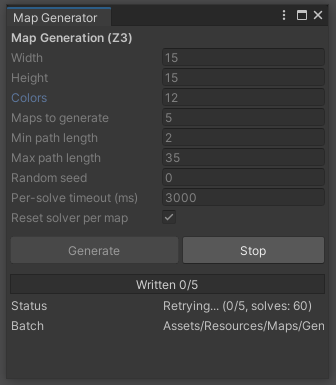
Each run drops its levels into a timestamped folder like Resources/Maps/Generated/20260809_142530/ with a small manifest recording the exact config — so I always know which settings produced which batch.
Wrapping up
The big lesson: describe the artifact, not the algorithm. Encoding “what makes a Flow Free level valid” as constraints is far easier than writing a bespoke generator, and it’s trivially tunable — change the size, color count, or length bounds and you get a different flavor of puzzle for free.
The one thing to watch is the gap between locally valid and globally valid. A quick validate-and-block loop bridges that gap without the pain of encoding full connectivity in the solver.
If you want to try this yourself, start tiny (a 5×5 with 3 colors), print the raw grid, and stare at the degrees until the rules click. From there, scaling up is just patience and a timeout.